
Table Of Content
What Is AutoPay And How Does It Work In The U.S.?
How AutoPay Actually Works Step-By-Step
What AutoPay Options Do You Get?
Statement Date VS. Due Date: The Critical Difference
The Grace Period: Your Interest-Free Window
Common AutoPay Mistakes Newcomers Make (And How To Avoid Them)
Setting Up AutoPay The Smart Way
Building Credit Shouldn't Feel Like Solving A Puzzle
FAQs
Understanding U.S. bill-pay culture can be confusing when you're new to the country. According to the Consumer Financial Protection Bureau, approximately 26 million people in the United States have limited English proficiency, creating barriers when navigating financial services.
Mix in AutoPay systems, statement cycles, and due dates, and it's easy to see why many newcomers struggle to understand what "paying on time" actually means, often leading to missed payments, fees, and damage to their credit score.
In this article, we'll break down U.S. bill-pay culture, explain how AutoPay works, clarify the true on-time payment meaning, and share tips to help you navigate this system with confidence.
Key Takeaways
Master U.S. bill-pay by understanding that "on time" means paying by the statement due date, not when you receive the bill.
AutoPay automatically deducts payments from your bank account on a set schedule, helping you avoid late fees and protect your credit.
You control three things with AutoPay: how much to pay (minimum, custom, or full balance), when it's deducted, and which account to use.
Always monitor your account, even with AutoPay active; it doesn't catch fraud, errors, or insufficient funds that could trigger fees.
Setting up AutoPay for your full statement balance is the only way to avoid interest charges on credit cards completely.
Understanding U.S. Bill-Pay Culture: What Makes It Different?
If you're new to the United States, the bill-pay system might feel unnecessarily complicated at first. In many countries, bills are straightforward: you get an invoice, you pay it before a deadline, and it's done. The U.S. system adds layers of complexity with statement cycles, grace periods, and automated payment options that aren't always clearly explained.
Why The U.S. Loves AutoPay
Americans have enthusiastically embraced automatic payments. The shift toward digital and automated billing has transformed how people manage money in the U.S. In 2024, the number of payments per month was around 48, up 6% from the previous year. This cultural shift happened because life here moves fast, people juggle multiple bills, and missing even one payment can have serious consequences for your credit score.
The U.S. financial system places enormous weight on payment history; it's actually the single most important factor in your credit score, accounting for 35% of your FICO score. That's why AutoPay has become so popular: it's essentially a safety net that ensures you never miss a payment deadline, even during your busiest weeks.
The Cultural Expectation Of "Personal Responsibility"
Here's something that surprises many newcomers: in the U.S., managing your bills is considered your responsibility. Unlike in some countries, where banks or companies may send multiple reminders before a due date, American companies typically issue a single statement and expect you to track the due date yourself.
You're expected to know your billing cycles and payment dates for every account
Companies rarely send courtesy reminders a few days before payments are due
Late fees can be charged immediately after the due date passes (often $25-$40 for credit cards)
Credit bureaus can be notified of late payments after just 30 days, damaging your credit score
This "set it and forget it" culture is why AutoPay became so widespread; it removes the burden of remembering dozens of due dates every month.
For newcomers still navigating language barriers, about 47% of immigrants who arrived in 2010 or later report limited English proficiency, according to Pew Research. These financial systems can feel especially confusing.
Understanding this cultural context helps explain why grasping the on-time payment meaning is so crucial when you're building your financial life in the U.S.
What Is AutoPay And How Does It Work In The U.S.?
AutoPay (short for "automatic payment") is a service that automatically withdraws money from your bank account or charges your debit/credit card to pay your bills on a predetermined schedule. Think of it as permitting a company to take payment from you automatically, so you don't have to remember to do it manually each month.
The Two Types Of Automatic Payments
It's important to understand that there are actually two different types of automatic payment systems in the U.S., and they work differently:
1. AutoPay Set Up Through The Biller
This is when you give a company (like your credit card issuer, utility company, or landlord) permission to automatically withdraw funds directly from your bank account or charge your card. You provide your account information, and they initiate payment on the scheduled date. This is the most common type for recurring bills like credit cards, utilities, and subscriptions.
2. Recurring Bill-Pay Through Your Bank
This is when you set up automatic payments through your bank's online banking platform. Instead of the company pulling money from your account, your bank pushes the payment to the company on your behalf. You log in to your bank, add the payee, set the amount and schedule, and your bank handles the funds transfer.
The key difference? With AutoPay, the company automatically debits the funds. With bank bill pay, your bank sends the funds. Both accomplish the same goal, but AutoPay is generally more reliable for ensuring the on-time payment meaning is met, since the company controls the timing.
How AutoPay Actually Works Step-By-Step
Let's walk through a typical credit card AutoPay scenario:
You enroll in AutoPay through your credit card issuer's website, mobile app, or by calling customer service.
You can provide bank account details (routing and account numbers) or link a debit card.
You choose your payment amount: minimum payment, full statement balance, or a custom amount.
You select a payment date: typically your due date, or you can sometimes choose another date.
Each billing cycle, the credit card company automatically withdraws the specified amount from your account on the scheduled date.
You receive confirmation via email or app notification once the payment process is complete.
The entire process runs automatically without you lifting a finger. You can modify settings or cancel AutoPay at any time, but it's best to do so several days before your next scheduled payment to ensure the changes take effect.
What AutoPay Options Do You Get?
When you set up AutoPay for a credit card (which is what we'll focus on since that's crucial for credit building), you typically choose from three payment amount options:
Minimum Payment: Pays only the smallest amount required by your issuer (usually 1-3% of your balance or $25-$35, whichever is higher).
Full Statement Balance: Pays your entire balance each month, avoiding interest charges altogether.
Custom Amount: Pays a specific dollar amount you choose, which is proper if you want to pay more than the minimum but can't always cover the full balance.
To build good credit and avoid interest charges, setting up AutoPay for your full statement balance is the gold standard. This ensures you're demonstrating the true on-time payment meaning by paying what you owe in full by the due date.
Statement Date VS. Due Date: The Critical Difference
This is where many newcomers get confused, and honestly, the U.S. system doesn't make it easy. Let's clear up the most crucial concept for managing credit cards and bills: what "on time" actually means.
Every credit card has two important dates each month, and mixing them up can cost you:
Statement Date (Closing Date)
This is when your billing cycle ends and your credit card company generates your monthly statement. It shows all the purchases and payments you made during that cycle (usually 28-31 days). Your statement balance is the total you owe as of that date.
Due Date (Payment Deadline)
This is the deadline by which you must make at least your minimum payment. It typically falls 21-25 days after your statement date. This is what determines whether you paid "on time" or not.
Here's the crucial part: the on-time payment meaning refers to making your payment by the due date, not the statement date. Your payment must be received (or posted, not just initiated) by the due date to count as on time.
Why This Confuses Newcomers
In many countries, bills are straightforward: you receive an invoice with a total amount and a payment deadline. The U.S. credit card system is more complex because:
You get your statement on one date, but don't have to pay until 3 weeks later.
You can make payments at any time, even before your statement arrives.
Your "current balance" (what you owe right now) often differs from your "statement balance" (what you owed on your statement date).
Payments take 1-3 business days to "post" (officially process), which can affect timing.
Many newcomers see their statement and think they need to pay immediately, or they wait too long and miss the actual due date. Understanding that you have a grace period between these dates (and must use it wisely) is key to mastering the on-time payment meaning in the U.S. system.
The Grace Period: Your Interest-Free Window
Here's a benefit many newcomers don't realize: if you pay your full statement balance by the due date each month, you'll pay no interest on your purchases. This interest-free period between purchase and payment is called the "grace period," and it typically lasts 21-25 days after your statement closes.
Example:
Statement date: January 15 (shows $500 balance).
Due date: February 10 (payment must arrive by this date).
Grace period: January 16 to February 10 (no interest charged during this time if you pay the full $500).
If you pay only the minimum or miss the due date, you lose the grace period and will start accruing interest on your daily balance. This is why nailing the on-time payment meaning, paying your full balance by the due date, saves you serious money.
Common AutoPay Mistakes Newcomers Make (And How To Avoid Them)
Even with AutoPay enabled, things can go wrong. Let's look at the most common mistakes people make when they're new to the U.S. bill-pay system, and how to avoid them.
Mistake #1: Setting AutoPay For Minimum Payment Only
Many newcomers set up AutoPay for the minimum payment, believing it is the safe, conservative choice. While it does prevent late fees and protects your credit score, it's expensive in the long run. Paying only the minimum means you'll carry a balance and pay interest charges (often 20-30% APR on credit cards), which can add up to hundreds or thousands of dollars over time.
Better approach: If you can afford it, set AutoPay to pay your full statement balance. This is the only way to avoid interest entirely while still meeting the on-time payment requirement. In fact, if you can't always pay in full, at least set AutoPay for more than the minimum to chip away at your balance faster.
Mistake #2: Forgetting To Monitor Your Bank Account Balance
AutoPay doesn't verify that you have sufficient funds in your account before processing. If your balance is too low when Putopay tries to withdraw funds, several bad things can happen:
Your bank may charge an overdraft fee ($25-$35 per transaction).
Your payment may be returned, triggering a returned payment fee from your credit card issuer ($25-$40).
If the payment doesn't process, you may also incur a late fee.
Your credit card company might report a missed payment to credit bureaus if it's 30+ days late.
Better approach: Mark your AutoPay date on your calendar and check your account balance a day or two before. Ensure you have sufficient funds to cover the payment, plus a small buffer for unexpected charges.
Mistake #3: Not Reviewing Statements Before AutoPay Processes
Just because AutoPay is handling your payments doesn't mean you can ignore your statements. You still need to review each statement for:
Incorrect or fraudulent charges
Fees you weren't expecting
Changes to your interest rate or terms
Credits or refunds you should have received
Better approach: Set a reminder to review your statement as soon as it's available (usually a few days after your statement date). If you spot any issues, you have time to dispute them before AutoPay withdraws the funds. Most credit card companies have deadlines for disputing charges (usually 60 days), so catching issues early matters.
Mistake #4: Missing The Due Date Change When You Set Up AutoPay
Some credit card companies allow you to choose your AutoPay date, which may not automatically align with your statement due date. If you set up AutoPay for the wrong date, your payment may process before the company has generated your statement (meaning it may not count toward that month's bill) or after your due date (making it late).
Better approach: When setting up AutoPay, double-check that the scheduled payment date is on or within a day or two before your actual due date. Verify this in your first month to make sure it's working correctly. This ensures you're meeting the true on-time payment meaning every month.
Mistake #5: Assuming AutoPay Means You Never Need To Check Your Account
This is perhaps the most dangerous assumption. AutoPay handles the mechanics of paying, but it doesn't:
Alert you to fraudulent activity
Notify you if your payment method is about to expire (like a linked debit card)
Warn you about sudden hefty charges that might overdraw your account
Catch mistakes in the billed amount
Better approach: Even with AutoPay, check your accounts at least once a week. A quick glance at your transactions can catch problems early, and staying engaged with your finances helps you make smarter decisions overall.
These mistakes are totally avoidable once you understand how the system works, which is why education is such a huge part of successfully navigating U.S. bill-pay culture.
Setting Up AutoPay The Smart Way
Ready to set up AutoPay for your credit card? Let's walk through the process and share some pro tips to make sure you're doing it right.
Step 1: Decide On Your Payment Amount Strategy
Before you log in to set up AutoPay, consider your financial situation and goals. You can choose what's best for you based on these strategies:
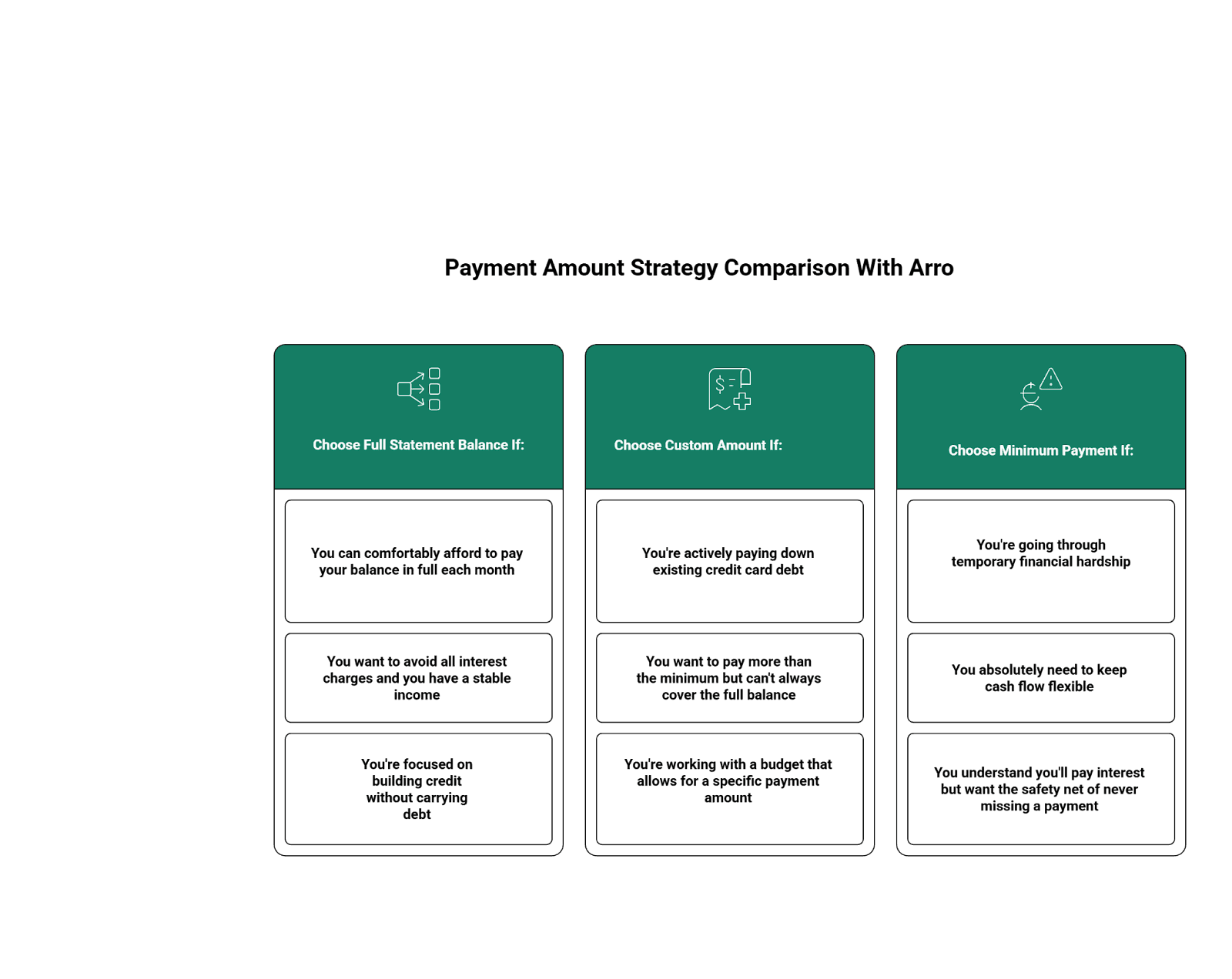
To build strong credit while keeping costs low, a full statement balance is the best option. It perfectly captures the meaning of on-time payment: paying what you owe, in full, by the deadline.
Step 2: Set Up AutoPay Through The Right Channel
Most credit card issuers offer multiple ways to enroll in AutoPay:
Mobile App (Easiest)
Open your credit card issuer's app
Navigate to "Payments" or "AutoPay Settings"
Select "Set Up Automatic Payments"
Choose your payment amount and date
Confirm your linked bank account
Save your settings
Website
Log in to your account on the issuer's website
Find the payments section
Look for "AutoPay," "Automatic Payments," or "Recurring Payments."
Follow the prompts to set the amount, date, and payment source
Confirm and save
Phone
Call the customer service number on your card
Request to set up automatic payments
Provide your bank account details verbally
Confirm the payment amount and schedule
App or website methods are usually the fastest and provide instant confirmation, but calling can be helpful if you have questions or need assistance.
Step 3: Choose Your Payment Date Carefully
Most issuers let you select when AutoPay processes. Here's what to consider:
Due date is safest: Set up AutoPay for your statement due date to ensure you meet the on-time payment deadline.
A few days before the due date is even better: it provides a buffer in case of bank holidays or processing delays.
Align with your paycheck: If you get paid on the 1st and 15th, consider setting your due date near one of those days so you know you'll have funds available.
Make sure the date you choose is consistently earlier than or on your statement due date. That's non-negotiable for protecting your credit.
Step 4: Verify Everything Before Finalizing
Before you hit "confirm" on your AutoPay setup, double-check:
The bank account information is correct (one wrong digit can cause payment failures)
The payment amount is what you intended (full balance, minimum, or custom)
The payment date aligns with your due date
You have sufficient funds in the account for the first payment
You've saved a screenshot or confirmation number for your records
This verification step prevents most AutoPay disasters. Take the extra 30 seconds, your future self will thank you.
Step 5: Monitor The First Few Payments
Don't just set it and forget it immediately. For the first 2-3 months with AutoPay:
Check that the payment process is on the correct date
Verify the correct amount is withdrawn
Make sure payments post to your credit card account properly
Confirm you're not being charged any unexpected fees
Once you've confirmed everything is working smoothly, you can relax a bit, though you should still review statements regularly as discussed earlier.
Also read:
Pass The Deposit: How Credit Impacts Security Deposits, Utility Bill Deposits, And Phone Plans
Streaming, Subscriptions, And Small Bills: Which Ones Can (And Can’t) Help Your Credit?
It’s All About the Plastic: Charge Card vs. Debit Card vs. Credit Card
Building Credit Shouldn't Feel Like Solving A Puzzle
Understanding what on-time payment really entails can feel overwhelming when you're new to the U.S., but once you grasp the basics and set up AutoPay for your full balance, it becomes automatic. Remember: "on time" means making at least your minimum payment by your statement due date every month. AutoPay helps you meet this deadline consistently as you build your new life.
Start by setting up AutoPay, monitoring your accounts weekly for sufficient funds, and reviewing statements monthly. These three habits set you up for success.
Why Choose Arro?
Building credit shouldn't be confusing or expensive, especially when navigating a new country's financial system.
Arro makes it simple with no hard credit checks, no deposit, and 1% cashback on gas and groceries.
Meet Artie, your 24/7 AI Money Coach who answers questions like "What does on-time payment actually mean for my credit?" and celebrates every win with you. Our bite-sized lessons help you master U.S. bill-pay culture, statement cycles, and credit-building habits, all in one app.
Every on-time payment, every lesson, every small step unlocks higher credit limits and better credit health. Thousands are already building stronger credit with Arro and having fun doing it.
Ready to start? Download the Arro app today and build credit with confidence. We've got you!
FAQs
What does on-time payment mean for credit cards in the U.S.?
On-time payment means making at least your minimum payment by your statement due date. The payment must post (fully process) by 11:59 PM on the due date in your credit card issuer's time zone. Even a one-day delay can trigger a fee and potentially harm your credit score if you're 30+ days past due.
Can I cancel AutoPay if I change my mind later?
Yes, you can cancel AutoPay at any time through your credit card issuer's app or website, or by calling customer service. However, please cancel at least 3-5 business days before your next scheduled payment to ensure it stops in time. After canceling, you'll need to make manual payments to avoid late fees and maintain your on-time payment requirement.
What if my debit card expires - will AutoPay still work?
If your linked debit card expires and you haven't updated your payment method, AutoPay will fail. Credit card issuers don't always notify you in advance, so it's your responsibility to update your card details before your payment date. Set a calendar reminder a month before your card expires to update your AutoPay payment method and avoid any interruptions.
Can I make additional manual payments if I have AutoPay set up?
Absolutely! AutoPay doesn't prevent you from making extra payments manually. If you have AutoPay set for the minimum but receive extra money mid-month, applying the extra funds to reduce your balance is a smart move. Just remember that AutoPay will still process as scheduled, so account for both when checking your balance.
Should I set AutoPay for my full balance or just the minimum payment?
For credit building and to avoid interest charges, setting up AutoPay for your full statement balance is ideal. This ensures you meet the on-time payment meaning requirement while paying zero interest. However, if you can't always pay in full, setting up AutoPay for at least the minimum payment protects you from late fees while you work toward paying down your balance.